OpenStreamHub: Building a macOS App for Hardware That Only Speaks Windows
How I ended up writing an unofficial macOS app for the Cooler Master MasterHUB: reverse engineering, building it with AI, five releases in, and what is still rough.
ARTICLE AUDIO
Audio has not been generated for this article yet.
This autumn I ordered a Cooler Master MasterHUB when it was on sale. If you haven’t seen one: it’s a modular control deck - a base with modules plugged into it. Mine has a 15-key keypad with a little screen behind every key, a 3-knob module, a round dial with a display, five faders and a two-roller scroll module.
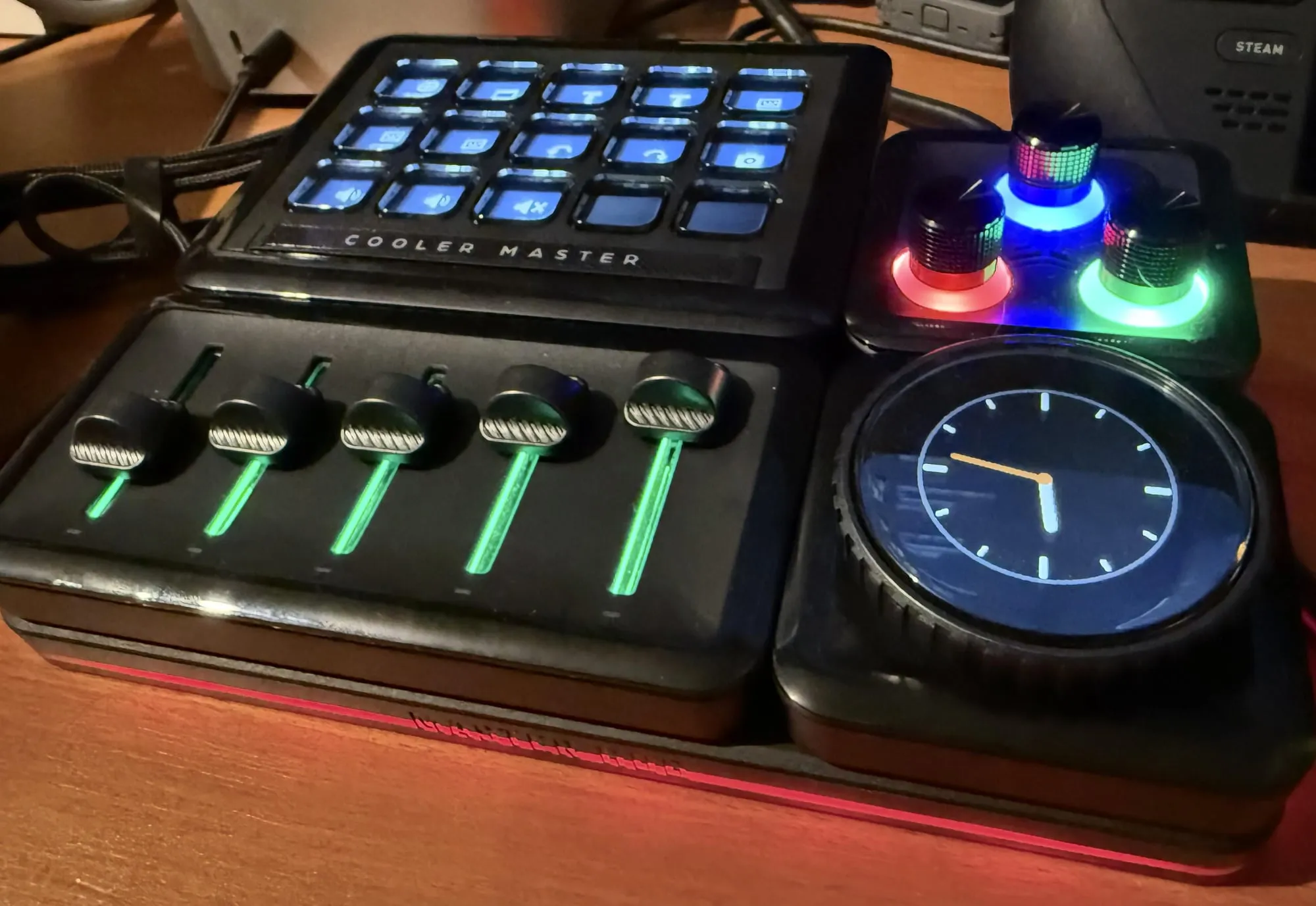
There was one catch, and I knew about it when ordering. I work mainly on a Mac, and the official software is Windows-only. Cooler Master’s software page doesn’t leave much room for interpretation: “Support for Windows 10 (64-bit) or later is required”. A macOS version had been coming soon for a while, and then the device was marked as legacy. So much for that.
Without the software, the modules don’t do much. They light up and play their built-in animations, but none of the keys does anything on your computer. Basically, a very nice-looking paperweight.
While the package was still on its way, I came across cooltek-sdk by projectzero7, a Rust SDK for these modules. How hard can it be to build an app on top of it?
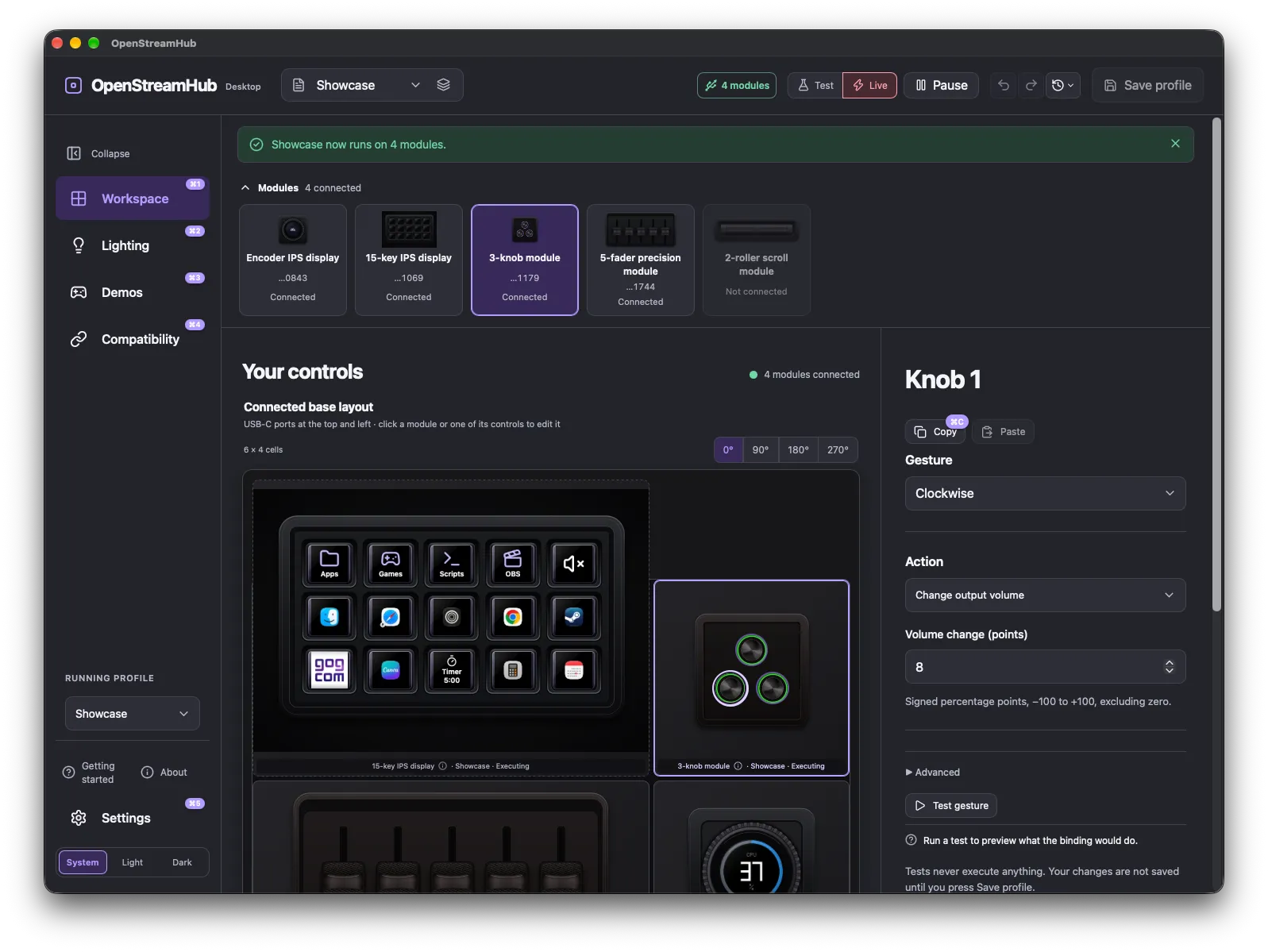
Quite hard, as it turned out. But a bit over two weeks later, the first version of OpenStreamHub was out - an open-source SDK and macOS app for the MasterHUB, aiming for parity with the official Windows app, and then some. Five releases later, it has plugins, if / else keys, OBS controls, and a key that answers Claude Code’s permission prompts (the app was built with Claude Code, so that one was kind of inevitable).
It’s not affiliated with Cooler Master in any way.
Standing on Someone Else’s SDK
projectzero7’s SDK, together with its companion probe repository with notes on the knob module’s feature reports and the keypad’s output reports, was my starting point. My protocol docs still cite those notes in several places.
OpenStreamHub continues that repository instead of just depending on it. The original commits from July are still in the history, the Rust crates keep their cooltek-sdk names, and the MIT / Apache-2.0 license carries over.
Good question: why fork instead of sending pull requests upstream? The upstream repo hasn’t moved since July, and what I was building wasn’t really an SDK anymore. It was an SDK, plus a background service, a profile format and a desktop app on top. Keeping them in one place means a protocol change and the app change that depends on it can land in the same commit.
The downside: I now maintain an SDK I didn’t write. I can live with that.
Reverse Engineering, With a Lot of Help
I’ll be upfront about it: the whole project, and the reverse engineering in particular, was done with generative AI (Claude Code, in my case). I know it’s a sore point for some people. Still, I work in software engineering, and USB protocols and firmware images are not exactly my daily bread - without the AI, this app wouldn’t exist.
The official MasterHUB app (version 1.0.0.113) is an Electron and Vue application. We downloaded the 332 MB package and took it apart without ever running it: the native CoolTEK libraries with their HID calls, and the original application sources, conveniently recovered from its Electron source maps. Later came USB packet sniffing and a look inside the firmware images.
For the first five days, nothing touched the actual hardware - for a simple reason: it was still in delivery. So everything came from the Windows app and was tested against fakes. That’s why every finding in the docs is marked as either derived or verified on a device, and why one rule held from day one - no firmware writes, ever. I’m fine with experimenting, but not with something I can brick.
The package arrived, and the first hardware session was on 8 October. Most of the static analysis held up. One thing was wrong, and one thing no amount of static analysis would have found.
The Lights That Wouldn’t Change
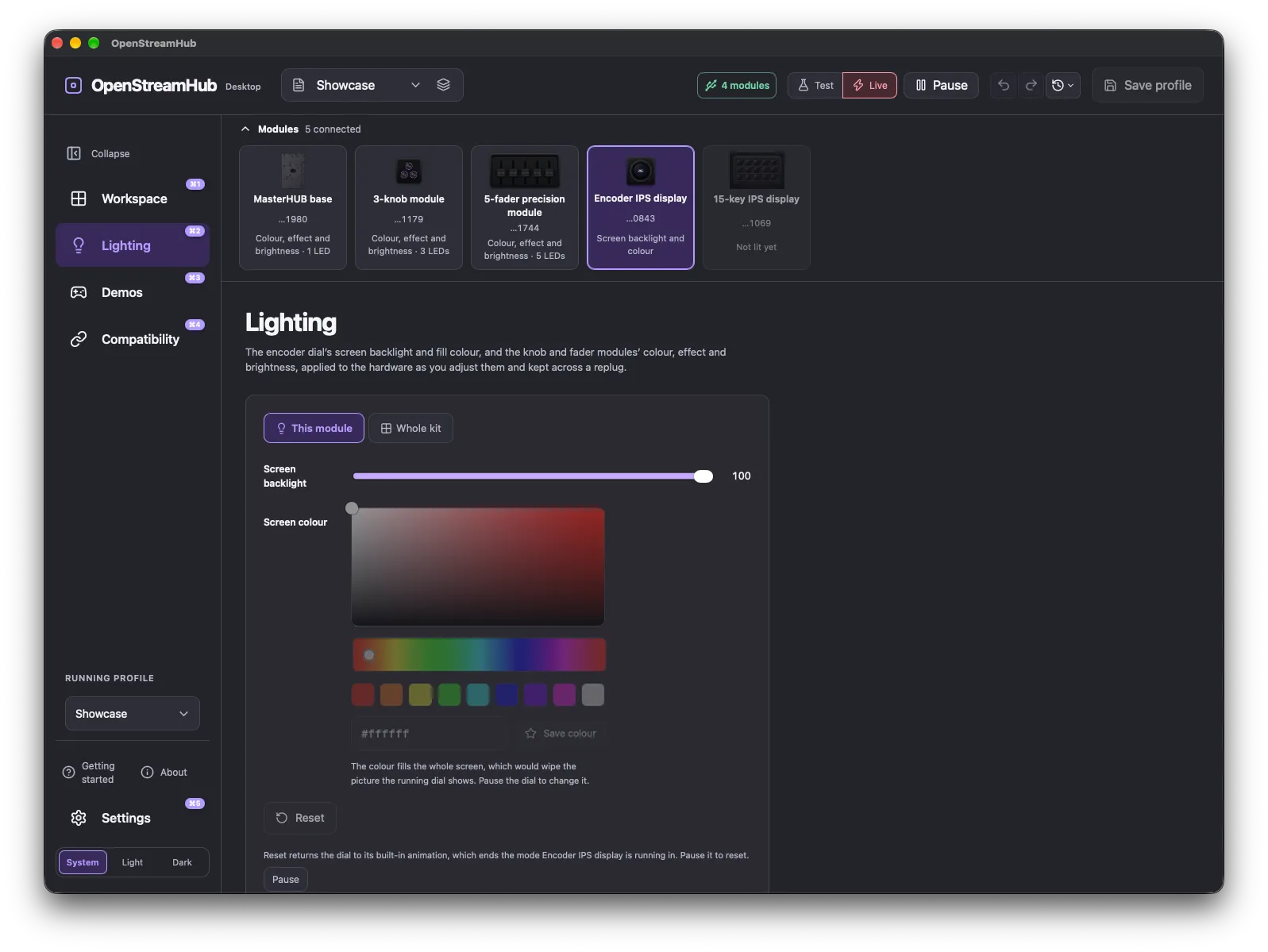
On the Mac, the base obeyed the lighting commands right away - solid red on the first try. The knobs and faders ignored everything. No errors, nothing. They just kept cycling through their colors.
So I sniffed the USB traffic of the official app on Windows with Wireshark and USBPcap. Same three commands, same structure, but the module type byte was 2 for knobs and 1 for faders. We had them the other way around, so every write went to a module type nobody was listening for.
The fix was two bytes, and it was verified on the hardware the same day. And while going through the effects, it turned out the firmware has a fast strobe mode that the official app never uses. It’s in OpenStreamHub now, so technically, the Mac app has more lighting effects than the Windows one.
The Silent Roller
The two-roller module - the one that comes with the base set - was a different story. It worked fine on Windows, and on macOS it sent nothing. Not a single report in four captures. My best guess at the time was that macOS simply doesn’t let apps talk to whatever layer this module uses. I couldn’t figure it out, so I have chosen to ship anyway, with the roller at the top of the “known limits” list.
On 25 October, KamilKobylarek opened issue #4 with the answer - they had hit the same silent roller in their own project. The roller’s firmware only starts reporting after a standard HID SET_IDLE request. Linux and Windows send it to every HID device they bind, but macOS sends it only to keyboards and mice. So my guess was close, but not quite. The SDK now sends that request every time the module opens, and 0.4.0 shipped with working rollers on 5 November.
Lesson learned: green tests against fakes only mean you decode what you expect the device to send.
Building It With AI
About 320 commits landed in the ten days before the first release, and there are almost 600 now. At that pace I obviously wasn’t writing every line. My job was mostly reviewing, steering, and deciding when something is really done.
The split of work settled quickly. The AI wrote the code, the diagnostic commands, the test scripts and most of the docs. I sat in front of the hardware, pressed the keys, watched the modules, and reported back what actually happened. You can see it in the hardware results - one LED check was a scripted run of 31 steps, five seconds each, with me watching every one of them.
And some things you can only catch with your hands. My first version of “a fader controls an OBS input’s volume” was linear, and it felt wrong - the first half of the fader’s travel did almost nothing. OBS uses a logarithmic scale for its own slider (about -19 dB at the halfway point), and once the mapping followed it, the fader behaved the way you’d expect.
The other thing to watch out for is the confidence. An AI will happily write “verified” about something nobody has seen working, and it sounds just as sure either way. The commit log has entries like “drop an unobserved claim about lighting persistence” and “stop overstating restore behaviour”. So the project keeps two lists: what is implemented, and what was confirmed on a real device (hardware results). The app shows the same split on its Compatibility page.
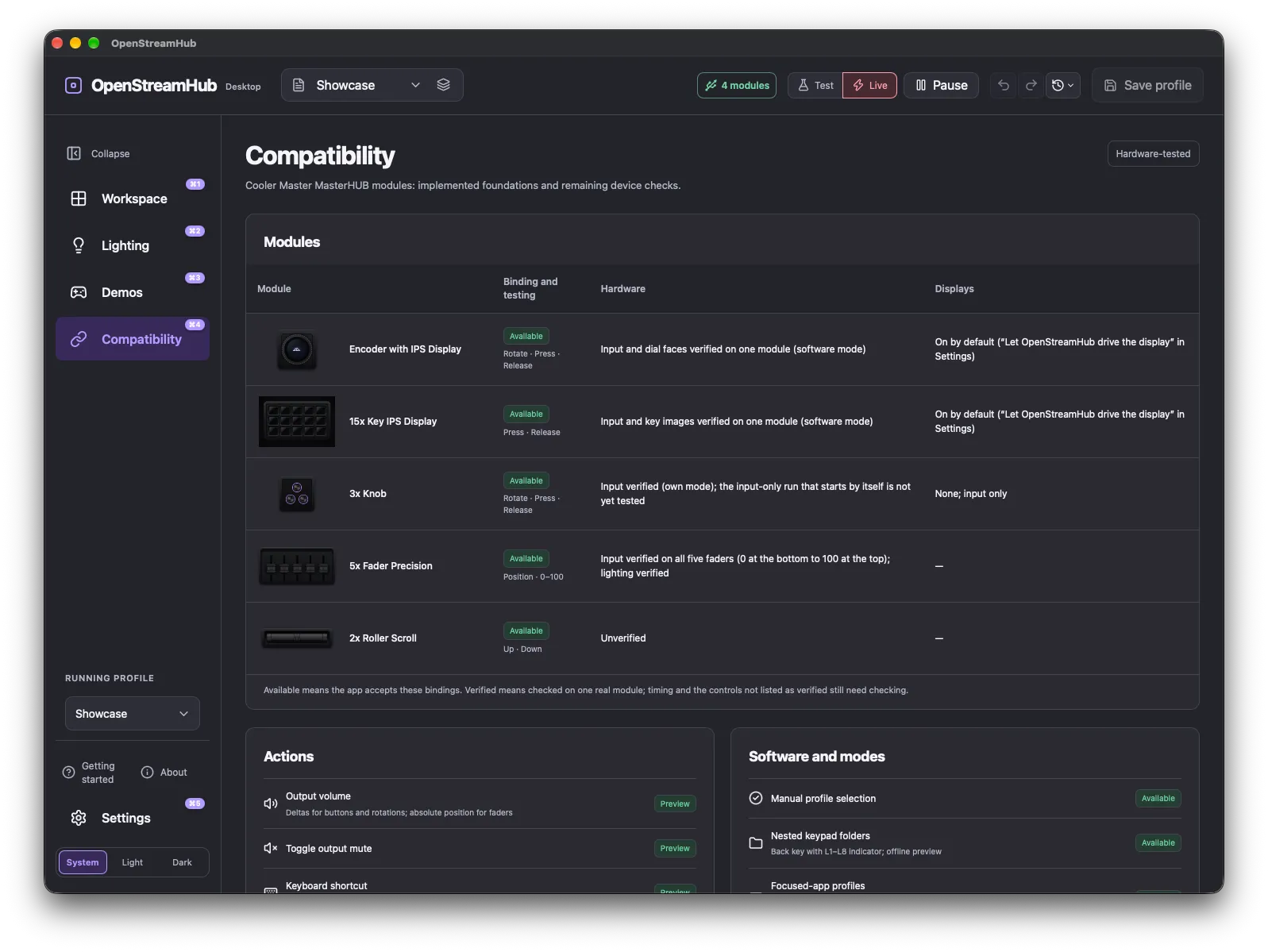
The lesson there: the AI can write the driver, but someone still has to sit in front of the device and watch.
Five Releases In
The first release covered the basics: profiles and bindings for keys, knobs, dial and faders, nested keypad folders, pictures and animations on the keys and the dial, lighting, and a decent set of actions - volume, apps, URLs, media controls, key macros, timers. It could even import profiles exported from the official app.
Each release after that added one bigger idea:
- 0.2.0 (14 Oct) - a menu bar mode, and a base layout that shows each module where it actually sits on the base, pictures turned to match when a module stands on its side.
- 0.3.0 (27 Oct) - if / else keys with variables (a key can do one thing while you’re recording in OBS, and another when you’re not), GIFs on the dial, and many more OBS actions. All 17 from the official app are there by now.
- 0.4.0 (5 Nov) - working rollers, and an AI agent like Claude Code or Codex can ask for permission on the deck and take Accept or Deny from a key.
- 0.5.0 (18 Nov) - plugins. They can add their own actions, conditions and pictures on the keys. The two official ones are Now Playing (Apple Music or Spotify on one key, album cover included) and Claude Code (your sessions on the keys, plus a context and cost meter on the dial).
Of course, there are also demos - Tic-tac-toe, and a 2048-style sliding game on the 15 keys. Fifteen keys with screens, it would be a shame not to.
As for privacy: there is no telemetry and no account, and everything stays on your Mac. Apart from plugins you enable yourself, the only thing that talks to the internet is the update check, which asks GitHub for the latest release - and it only runs when you press the button, unless you turn on the daily check.
Decisions I’d Make Again
Tauri instead of native. A macOS-only app could have been written in SwiftUI. But the hardware layer was already Rust, and Tauri let me use the same crates in the app and in the background service, with React on the client. The first release took about 22 MB on disk (according to Pearcleaner), and the download is still under 10 MB. Will it ever feel quite like a native app? Probably not. I’m fine with that.
A separate service owns the device. The app doesn’t talk to the hardware directly - a small service process does. If the app crashes, the service notices and puts the modules back into their own mode, so your keypad never gets stuck. It’s one more moving part to build and ship, but a stuck keypad would be worse.
Test before Live. When a key can quit apps or type into windows, you want a safe way to try a profile first. In Test mode a key press shows what it would do without doing it, and Live runs it after you confirm. “Go live” in OBS needs two presses within three seconds, so a stray key can’t start your stream.
Unsigned, and staying that way. Signing and notarization need a paid Apple Developer account, and this is a free side project. Unfortunately, the cost of that decision is on you: you have to allow the app in System Settings → Privacy & Security before the first run, and since macOS treats every unsigned update as a brand new app, it may ask for permissions again after updating. The install instructions walk you through it.
What Is Still Rough
Every limit I know of is written down in the repo, but these are the ones worth knowing before you install it:
- It was tested on one rig - mine, plus KamilKobylarek’s roller for the
SET_IDLEfix. Other combinations of modules may surprise me. - The Intel build has never been launched. It’s cross-compiled on an Apple Silicon Mac.
- Plugins run as you. The permissions a plugin declares are shown, not enforced (apart from which variables it may set), so install them only from authors you trust.
- Not there yet:
.mhzexport, firmware updates, Twitch and Discord integrations, and any language other than English. Linux and Windows aren’t planned either - not impossible, just not an easy feat.
Closing Thoughts
What started as “I just want my keypad to work on a Mac” turned into a reverse-engineering project, a desktop app with plugins, and my first real project built mostly with an AI. Don’t get me wrong, I like the features. But what I’m proudest of is the two lists - what works, and what has actually been seen working. And the bug I couldn’t crack got fixed because someone fighting the same roller shared the answer.
If you have a MasterHUB and a Mac, grab the build from the latest release (Intel and Apple Silicon, macOS 12.3 or later). The most useful thing you can do is run it on hardware I don’t have: other module combinations, a second roller module, an Intel Mac, a Mac that sleeps overnight. If something breaks, the app can create a diagnostic bundle you can attach to a GitHub issue.
Thanks to projectzero7 for the SDK underneath all of this, and to KamilKobylarek for making the rollers talk.
Technical Stack Overview
- App: Tauri 2, React, TypeScript
- Hardware layer: Rust (
cooltek-sdkcrates), HID via HIDAPI - Device access: a separate
masterhub-serviceprocess - Profiles: versioned JSON
- License: MIT or Apache-2.0